


Free Lead Gen Tool: How We Built Our Own for $0
We built a free lead gen tool to find our own clients — and it cost us nothing to run. Here’s the whole story.
Running a small web studio means wearing a lot of hats. Designer. Developer. Account manager. And, less glamorously — salesperson who sends cold emails.
Finding clients is the part nobody talks about. You’ve got a solid process, a good portfolio, a flat-rate offer that makes sense. But none of that matters if the phone isn’t ringing.
So we built something. We call it SNS Prospect Hunter — an internal tool that finds local businesses with no website, tracks them through a sales pipeline, and pairs with a demo site workflow to close at $500. Total cost to build and run: essentially zero.
The Problem
Our model is simple: find local businesses that need a website, show them what one could look like, and offer to build it for a flat fee.
The hard part is the “find” step. You can scroll Google Maps by hand, but it’s slow and you have no way to track who you’ve already contacted. We needed something repeatable — something we could actually use week over week.
We didn’t want to pay $99/month for a prospecting tool built for enterprise sales teams. We wanted something lean, private, and built exactly the way we work.
The Stack (All Free Tier)
The whole thing runs on tools we were already using or that have generous free plans:
- Frontend: A single
index.htmlfile on GitHub Pages — no framework, no build step, no cost. - Database: Supabase (PostgreSQL) for storing leads, email templates, and activity logs.
- Search: Google Places API to find businesses by keyword and location, filtered to only show results with no website listed.
- API Security: A Supabase Edge Function that proxies the Google API calls server-side, keeping our key out of the frontend.
- Email: Gmail API via OAuth so we can send directly from our inbox without copy-pasting.
The whole thing lives at a private GitHub Pages URL that is PW protected as well.
How Our Free Lead Gen Tool Actually Works
Three tabs do most of the work:
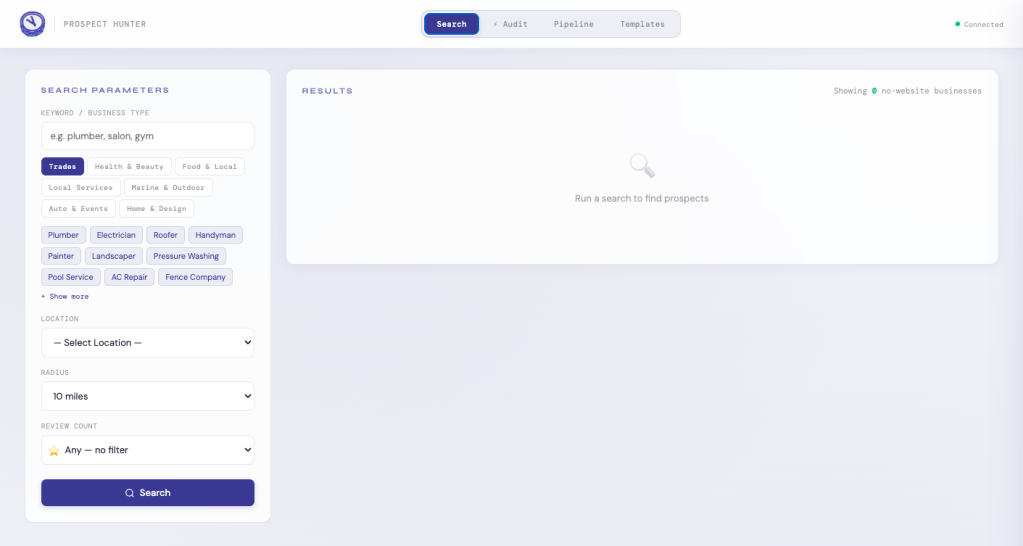
Search. Type in a keyword (“plumber,” “barbershop,” “pressure washing”), pick a location radius, and the tool hits the Google Places API. It filters for businesses with no website in their listing and shows the results. One click adds them to the pipeline.
Pipeline. Five columns: New → Contacted → Followed Up → Converted → Dead. Click any lead to open a drawer with their info, an email field, a template picker, and a send button. Emails go out via Gmail API — branded — and the lead’s status updates automatically.
Audit. Instead of finding businesses with no site, this tab finds businesses that have one and runs a PageSpeed Insights score on it. Red scores open a different conversation: “Your site exists, but it might be hurting you more than helping.”
Templates live in Supabase and are fully editable. Merge tags like {{business_name}} and {{city}} fill in automatically.
The Demo Site Piece
The tool is only half the workflow. Once we find a promising lead, we pull their Google data — name, address, phone, reviews — and build them a real demo site. Not a mockup. It goes live on GitHub Pages and the link goes in the outreach email.
Subject line: I went ahead and built this for [Business Name].
We’re not asking if they want a website. We’re showing them one.
Honest Notes from the Build
Add email capture from day one. We didn’t include an email field on the lead record early on and had to go back and fill things in manually. Small thing, annoying in practice.
The pitch is a separate problem. The tool surfaces the right businesses. Getting a reply is still a work in progress. We’ve sent a lot of cold emails. We’re still iterating and building enhancements.
Build for how you actually work, not how you think you will. We added follow-up automation and reply tracking. Haven’t touched either. The core loop — search, add, send, follow up — is what we use. Build that first.
Why We’re Sharing This
We’re not selling the tool. It’s private and built around exactly how we work.
But small studios should build internal tools. Not because it’s the most efficient use of time — because it forces you to think through your actual process. What is a lead? What does “contacted” mean? What’s a follow-up look like? The tool just makes that thinking visible.
If you’re a freelancer or small agency trying to build a more consistent pipeline, the same stack would work for you. GitHub Pages + Supabase + Google Places API gets you most of the way there for free.
And if you’re a local business in the St. Augustine area without a website — there’s a decent chance we already found you.